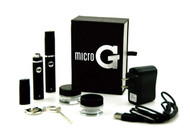
What is the MicroG?
The MicroG comes with two vaporizer pens and is a wax only vaporizer. Some versions of the MicroG can work with dry herbs but the one we sell here is wax only.
- Mouthpiece – This is where your mouth goes.
- Heating Chamber – You’ll be placing your wax on the screen that’s connected to this.
- Battery – This piece is not accessible by the user, but it’s the piece that will power the MicroG. It can be charged from the bottom.
How To Turn On The MicroG
The MicroG is turned on by pressing the power button 5 times consecutively and rapidly. This is the common method used for turning on most vaporizers. It’s done this way as a safety measure and to allow the vaporizer to heat up to higher temperatures.
How To Use The MicroG
Remove the mouthpiece from the Pen, revealing the heating chamber. In some cases, the Heating Chamber can get stuck to the mouthpiece, and new users can tell if this is the case because the silver ring is the actual Heating Chamber. Once you’ve got it revealed, place your wax on top of the small mesh screen. Then, put the mouthpiece back on.
Using the method above, turn on the MicroG Vaporizer. Once it’s on, bring the mouthpiece up to your mouth and hold down the power button to begin vaping. From here on out, everything should come naturally.
Thanks For Reading Our Guide On How To Use The MicroG!
We hope you’ve gained a clear understanding of how to make it work for you.
Buy it Here: MicroG Vaporizer
Happy Vaping!